指定したAPIのスキーマ情報(フィールド定義やカスタムフィールドの構成)を取得できるAPIです。
マネジメントAPIのGET APIリクエストの際に必要な認証キーです。
マネジメントAPIのデフォルト権限で「API情報の取得」を有効にして、リクエストヘッダーに含めて送信してください。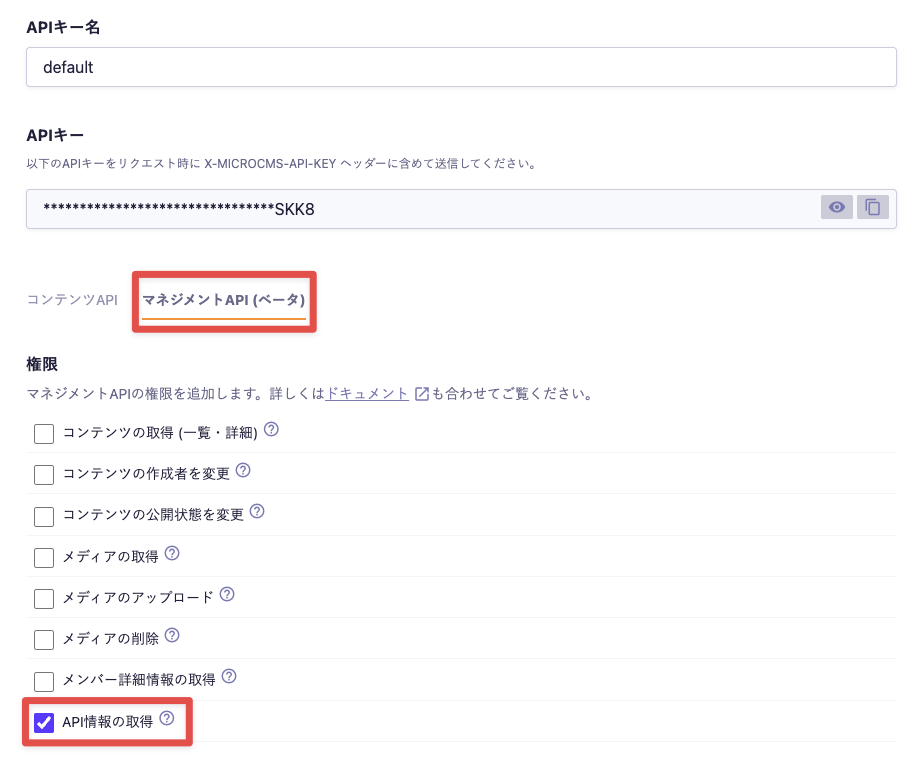
X-MICROCMS-API-KEYが判別できると、第三者による不正なコンテンツの操作が可能となります。お取り扱いには十分ご注意ください。詳細は「APIキー(APIの認証と権限管理)」をご覧ください。
基本的には、APIスキーマのエクスポートでエクスポートしたJSONと同様のデータがレスポンスとして返却されます。
こちらがマネジメントAPIで取得したAPI情報のレスポンス例です(※例として一部のフィールドのみとなります。全ての種別のフィールドを網羅してはおりません)。
{
    "apiFields": [
        {
            "fieldId": "title",
            "name": "タイトル",
            "kind": "text",
            "description": null,
            "required": false,
            "textSizeLimitValidation": null,
            "patternMatchValidation": null,
            "isUnique": false,
            "initialValue": null
        },
        {
            "fieldId": "body",
            "name": "本文",
            "kind": "richEditorV2",
            "description": null,
            "required": false,
            "richEditorV2Options": [
                "headerOne",
                "headerTwo",
                "headerThree",
                "headerFour",
                "headerFive",
                "undo",
                "redo",
                "paragraph",
                "bold",
                "italic",
                "underline",
                "strike",
                "code",
                "blockquote",
                "codeBlock",
                "listBullet",
                "listOrdered",
                "link",
                "image",
                "file",
                "table",
                "horizontalRule",
                "textAlign",
                "customClass",
                "oembedly",
                "clean",
                "color",
                "size"
            ],
            "richEditorV2ColorList": [],
            "richEditorV2HideColorPicker": false,
            "richEditorV2FontSizeList": [],
            "customClassList": []
        },
        {
            "fieldId": "tags",
            "name": "タグ",
            "kind": "select",
            "description": null,
            "required": false,
            "selectItems": [
                {
                    "id": "5EfR-A1XsD",
                    "value": "更新情報"
                },
                {
                    "id": "i4B3HBpTGI",
                    "value": "チュートリアル"
                },
                {
                    "id": "ZGZjQPTtds",
                    "value": "お知らせ"
                }
            ],
            "multipleSelect": true,
            "initialValue": [
                "DEFAULT"
            ]
        },
        {
            "fieldId": "category",
            "name": "カテゴリ",
            "kind": "relation",
            "description": null,
            "required": false,
            "listViewFieldId": "DEFAULT",
            "referencedApiEndpoint": "categories"
        },
        {
            "fieldId": "image-w-name",
            "name": "名前付き画像(単体)",
            "kind": "custom",
            "description": null,
            "required": false,
            "listViewFieldId": "DEFAULT",
            "customFieldId": "image-w-name"
        },
        {
            "fieldId": "image-w-name-list",
            "name": "名前付き画像リスト",
            "kind": "repeater",
            "description": null,
            "required": false,
            "repeaterCountLimitValidation": null,
            "customFieldIds": [
                "image-w-name"
            ]
        }
    ],
    "customFields": [
        {
            "fieldId": "image-w-name",
            "name": "名前付き画像",
            "fieldOrderByColumn": [
                [
                    "name"
                ],
                [
                    "image"
                ]
            ],
            "fields": [
                {
                    "fieldId": "name",
                    "name": "名前",
                    "kind": "text",
                    "description": null,
                    "required": false,
                    "textSizeLimitValidation": null,
                    "patternMatchValidation": null,
                    "isUnique": false,
                    "initialValue": null
                },
                {
                    "fieldId": "image",
                    "name": "画像",
                    "kind": "media",
                    "description": null,
                    "required": false,
                    "imageSizeValidation": null,
                    "initialValue": null
                }
            ]
        }
    ]
}管理画面のAPIエクスポートでエクスポートしたAPIスキーマのJSONとは、キーの並び順などが異なることがあります。
