Text
Parameters
txt
Overlays text on the image.
This value is required to display text.
If not set, all other text parameters will be ignored.
Example: ?txt=Hello%20World!

Example) ?txt=HELLO%20WORLD!&txt-size=62&txt-color=ffffff&txt-align=middle,center&txt-font=Futura%20Condensed%20Medium

txt-align
Sets the alignment of the text overlay within the image.
For vertical alignment, you can choose top, middle, or bottom, and for horizontal alignment, left, center, or right.
The default is bottom, right.
Example: ?txt=Hello%20World!&txt-align=middle,center

txt-clip
Cuts off text that exceeds the display area.
Specify the position to cut from start, middle, or end, and you can display "..." based on the presence of ellipsis.
The default is end.
Additionally, you can control the display area using txt-pad and txt-width.
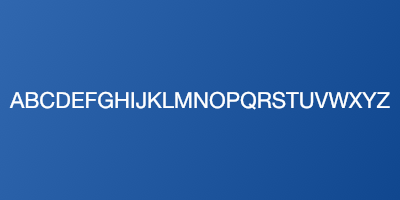
Example: ?txt=ABCDEFGHIJKLMNOPQRSTUVWXYZ&txt-size=62&txt-color=ffffff&txt-align=middle,center&txt-clip=end,ellipsis

Example) ?txt=ABCDEFGHIJKLMNOPQRSTUVWXYZ&txt-size=62&txt-color=ffffff&txt-align=middle,center&txt-clip=middle

txt-color
You can specify the text color.
Use hexadecimal formats such as RGB, ARGB, RRGGBB, and AARRGGBB.
A represents the alpha value (transparency), while RGB represents the values for red, green, and blue, respectively.
The default is 000.
Example: ?txt=microCMS&txt-size=62&txt-color=99ffffff&txt-align=middle,center

txt-fit
Fits the text to the display area.
max is the only option that can be specified.
The default is none specified.
Example: ?txt=ABCDEFGHIJKLMNOPQRSTUVWXYZ&txt-size=62&txt-color=fff&txt-align=middle,center&txt-fit=max

txt-font
You can specify the font for the text.
You can use CSS category specifications (serif, sans-serif, monospace, cursive, fantasy) or explicit font names.
You can also specify bold and italic using a comma.
Example) ?txt=microCMS&txt-size=62&txt-color=fff&txt-align=middle,center&txt-font=Helvetica%20Neue

Example: ?txt=microCMS&txt-size=62&txt-color=fff&txt-align=middle,center&txt-font=serif,italic

txt-size
You can specify the text size.
The default value is 12.
Example: ?txt=microCMS&txt-size=24&txt-color=fff&txt-align=middle,center

txt-line
You can specify the outline width for the text.
The outline is drawn inside the text.
The default value is 0.
Example: ?txt=microCMS&txt-size=70&txt-color=0000&txt-align=middle,center&txt-line=2

txt-line-color
You can specify the outline color of the text.
Please use it in conjunction with txt-line.
Specify in hexadecimal format: RGB, ARGB, RRGGBB, AARRGGBB.
A represents the alpha value (transparency), and RGB represents the values for red, green, and blue respectively.
The default is fff.
Example: ?txt=microCMS&txt-size=70&txt-color=0000&txt-align=middle,center&txt-line=2&txt-line-color=ffc427

txt-pad
You can specify the padding around the text.
The default is 10.
Example: ?txt=microCMS&txt-pad=20

Example)?txt=ABCDEFGHIJKLMNOPQRSTUVWXYZ&txt-size=62&txt-color=ffffff&txt-align=middle,center&txt-clip=end,ellipsis&txt-pad=50

txt-shad
Adds shadow to the text.
Specify with a parameter from 0 to 10.
The default is 0.
Example) ?txt=HELLO%20WORLD!&txt-size=32&txt-color=ffffff&txt-align=middle,center&txt-shad=5

txt-width
Specifies the width of the text.
If it exceeds the text area, it will be automatically clipped.
You can adjust the clipping method using the txt-clip parameter.
The default value is automatically calculated based on the width of the image.
Example: ?txt=HELLO%20WORLD!&txt-size=32&txt-color=ffffff&txt-align=middle,center&txt-width=200

txt-x
Specifies the X-axis of the text.
Example) ?txt=HELLO%20WORLD!&txt-size=32&txt-color=ffffff&txt-x=25

txt-y
Specifies the Y-axis for the text.
Example) ?txt=HELLO%20WORLD!&txt-size=32&txt-color=ffffff&txt-y=25