Custom Status
microCMS provides three statuses: "Published," "Draft," and "Archived." In addition to these, you can create custom statuses and assign them to your content.
Information
Custom status is a feature available in the Business and Enterprise plans.
For details on the features available in each plan, please refer to the pricing page.
How to Create
Custom statuses can be created for each API.
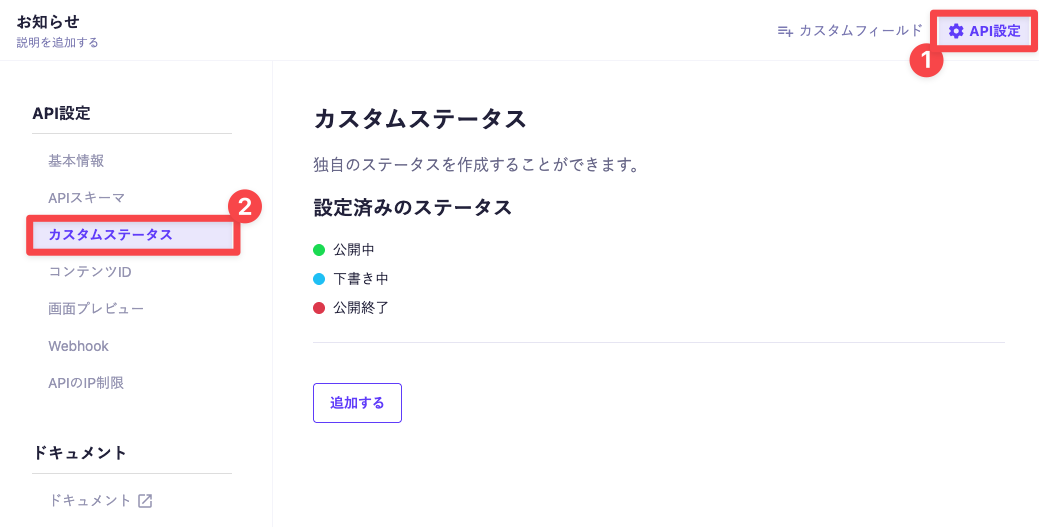
To create a custom status, go to the top right of the API screen and select "API Settings" → "Custom Status," which will take you to the settings screen.
Here, we will introduce an example of creating a campaign end status.

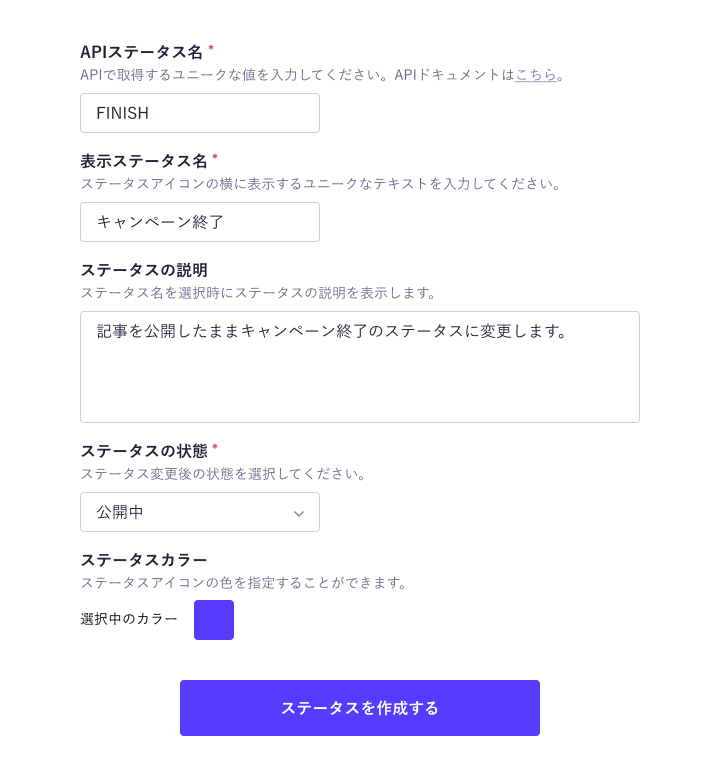
Press the add button and enter the information needed to create the status.

Please enter the following information for each item.
- API Status Name: The status name that will be reflected in the API. Please set a name other than the default content statuses "PUBLISH," "DRAFT," and "CLOSED."
- Display Status Name: The status name displayed in the management screen. Set a name that clearly indicates what the status is at a glance.
- Status Description: Set a description for the status if available. It can be left blank.
- Status State: Choose the status state from "Published," "Draft," or "End of Publication."
- Status Color: Set the color of the status displayed in the management screen from the color palette.
Please enter values for "API Status Name" and "Display Status Name" that do not duplicate existing statuses.
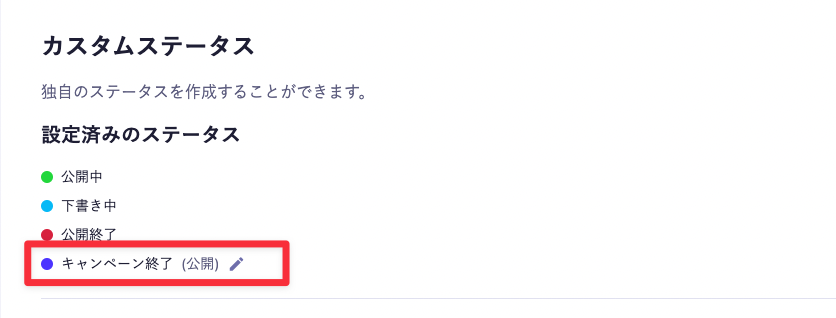
Once the custom status is created, it will be displayed in the list.

How to Use
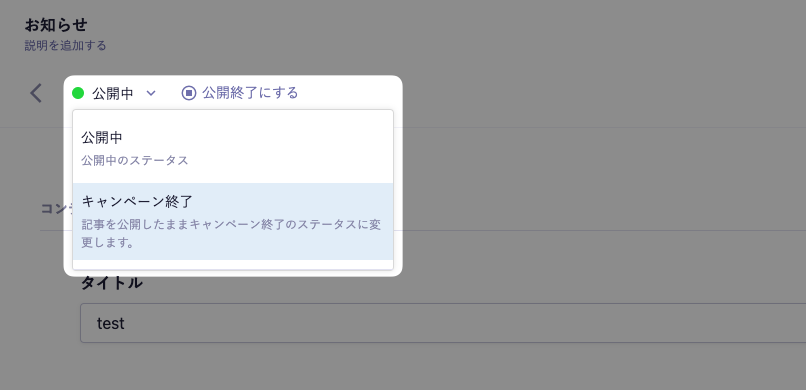
Once a custom status is created, the status display in the content detail screen will change to a dropdown, allowing you to switch the status here.

Information
- Even if the status state and status color are different, the API status name and display status name cannot be created as duplicates.
- You cannot change to a custom status with a different status state. In that case, please perform actions such as "End Publication" or "Revert to Draft" to change the status state, and then set the desired custom status.
How to Retrieve Custom Status via API
Custom status is not included in the content API response.
To retrieve custom status via API, you will use the Management API (Beta).
When you make a request to content that includes custom status using the Management API (the target endpoint will be described later), the response will include customStatus as an array, as shown below.
The contents of the management screen will be reflected in the response.
- API Status Name:
key - Display Status Name:
name - Status Description:
description - Status State:
behavior - Status Color:
color
{
"id": "string",
"createdAt": "2019-08-24T14:15:22Z",
"updatedAt": "2019-08-24T14:15:22Z",
"publishedAt": "2019-08-24T14:15:22Z",
"revisedAt": "2019-08-24T14:15:22Z",
"status": [
"PUBLISH"
],
// This customStatus will be newly added.
// If customStatus is not supported by the plan or not set, it will be null.
"customStatus": [
{
"key": "USER_DEFINED_CUSTOM_STATUS_KEY123",
"description": "This is a user-defined custom status.",
"name": "Custom Status Test",
"behaviour": "PUBLISH",
"color": "#a20063",
"createdAt": "2019-08-24T14:15:22Z",
"updatedAt": "2019-08-24T14:15:22Z"
}
],
"draftKey": "string",
"createdBy": "string",
"updatedBy": "string",
"reservationTime": {
"publishTime": "2019-08-24T14:15:22Z",
"stopTime": "2019-08-24T14:15:22Z"
}
}
Currently, the following endpoints are supported. Please refer to the documentation below for details on the Management API.