microCMS

GET /api/v1/members

This is an API that allows you to retrieve a list of members belonging to any service.

Request Header

X-MICROCMS-API-KEY

This is the authentication key required for GET API requests.
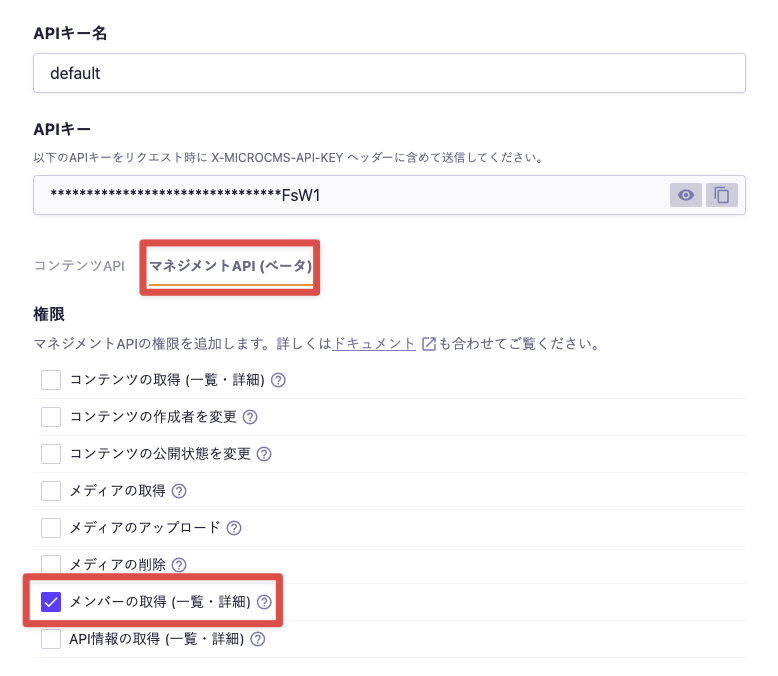
Please enable the "Get Members (List/Detail)" permission in the Management API and include it in the request header when sending.

cautionCaution

If the X-MICROCMS-API-KEY is identifiable, it may allow unauthorized manipulation of content by third parties. Please handle it with care. For more details, please refer to "API Key (API Authentication and Authorization Management)".

Response Body

This is an example of the response for the member list when successfully retrieved.

{
  "members": [
    {
      "id": "xxxxxxxx-xxxx-xxxx-xxxx-xxxxxxxxxxxx",
      "name": "test-member",
      "email": "test@microcms.co.jp",
      "mfa": true,
      "inviting": false
    },
    {
    ...
    }
  ],
  "totalCount": 120,
  "token": "xxxxxxxxxxxxxxxxxxxxxxxxxxxxxxxxx"
}

The response includes the following data.

members

An array of members. Each member object contains the following data.
Invited members are not included in the response.

Value

Description

id

The member's ID.

name

The member's display name. If not set, it will be an empty string ("").

email

The member's email address.

mfa

Indicates whether two-factor authentication is enabled. (true: enabled, false: disabled) For SAML users, it will be false.

inviting

Indicates whether the member is being invited. (true: inviting, false: already joined) Currently, it will always be false.

totalCount

The total number of members.

token

A token used for pagination. It is returned when there is a next page available.
By specifying this value in the query parameter token of the next request, you can retrieve the subsequent data.

Query Parameters

limit

Please specify the number of members to retrieve.

  • Possible values: 0-100
  • Default value: 10

token

Please specify the token to be used for pagination.
By specifying the value of token included in the response in the next request, you can retrieve the subsequent data.