Selectable Field
The select field is a field for inputting one or more values selected from predefined options set in the management screen.
It is suitable for categorizing and attributing data from fixed options, such as product size variations (S/M/L) or prefectures.
Data Submission Method
Single Selection (Multiple Selection OFF)

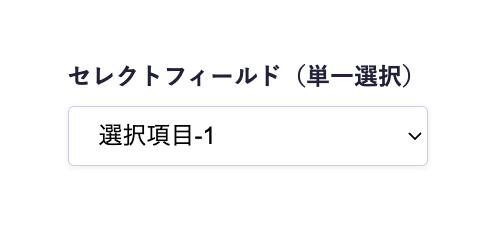
If "Multiple Selection" is set to OFF in the schema settings, it will be displayed in a dropdown format.
- Clicking on the field will display a list of predefined options.
- Select one relevant item from the list.
Multiple Selection (Multiple Selection ON)

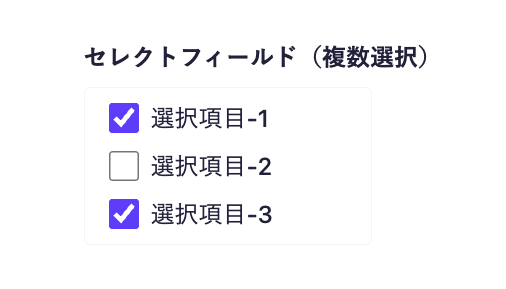
If "Multiple Selection" is set to ON in the schema settings, it will be displayed in a checkbox format.
- A list of predefined options will be displayed.
- Click the checkbox of the relevant item to select it.
Please refer to the following documents for submission using API and CSV.
Limitations / Notes
- There is no upper limit on the number of items that can be set.
- If used as a category for blogs, there are disadvantages compared to implementing it with a content reference field. For details, please refer to the help article "How to create categories and tags for blogs and announcements?".
- The order of the array in the API response is based on the order selected in the submission screen, not the order defined in the schema.
Settings Item | Description |
|---|---|
Required Field | When set to ON, input is required during submission. |
Description | This is the description displayed on the submission screen. |
Options | You can add, edit, or delete options. |
Multiple Selection | This setting determines whether multiple selections are allowed. It can only be set when creating a new item and cannot be changed later. |
Default Value | You can specify which item should be selected by default when creating new content. |
Response Format of GET API
Please refer to the documentation below for details.
How to Use in Frontend
The select field is always retrieved as an array, regardless of the multiple selection setting, so in the frontend implementation, a loop is used to display the selected items.
Below is an implementation example using Next.js.
export default async function Page({ params }) {
const { slug } = await params;
// Fetch data using the microCMS JavaScript SDK (https://github.com/microcmsio/microcms-js-sdk)
const data = await client.getListDetail({
endpoint: "blog",
contentId: slug,
});
return (
<main>
{/* selectField is the field ID. Please replace it with the actual field ID */}
{data.selectField.map((tag, index) => (
<span key={index}>{tag}</span>
))}
</main>
);
}