This API allows you to retrieve schema information for the specified API (field definitions and the structure of Custom Fields).
This is the authentication key required for GET API requests to the Management API.
Please enable "Retrieve API Information" with the default permissions of the Management API and include it in the request header when sending.
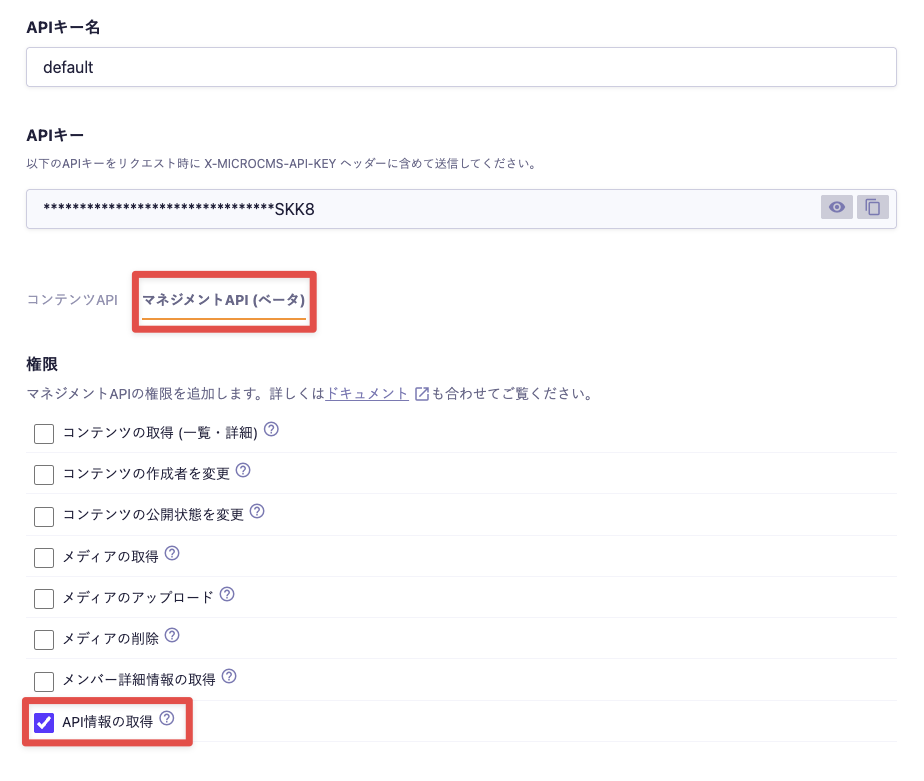
If the X-MICROCMS-API-KEY is identifiable, it may allow unauthorized manipulation of content by third parties. Please handle it with care. For more details, please refer to "API Key (API Authentication and Authorization Management)".
Essentially, the data returned in the response is similar to the JSON exported via Exporting the API Schema.
Here is an example of the response for API information obtained from the Management API (Note: This example includes only a subset of fields and does not cover all types of fields).
{
    "apiFields": [
        {
            "fieldId": "title",
            "name": "Title",
            "kind": "text",
            "description": null,
            "required": false,
            "textSizeLimitValidation": null,
            "patternMatchValidation": null,
            "isUnique": false,
            "initialValue": null
        },
        {
            "fieldId": "body",
            "name": "Body",
            "kind": "richEditorV2",
            "description": null,
            "required": false,
            "richEditorV2Options": [
                "headerOne",
                "headerTwo",
                "headerThree",
                "headerFour",
                "headerFive",
                "undo",
                "redo",
                "paragraph",
                "bold",
                "italic",
                "underline",
                "strike",
                "code",
                "blockquote",
                "codeBlock",
                "listBullet",
                "listOrdered",
                "link",
                "image",
                "file",
                "table",
                "horizontalRule",
                "textAlign",
                "customClass",
                "oembedly",
                "clean",
                "color",
                "size"
            ],
            "richEditorV2ColorList": [],
            "richEditorV2HideColorPicker": false,
            "richEditorV2FontSizeList": [],
            "customClassList": []
        },
        {
            "fieldId": "tags",
            "name": "Tags",
            "kind": "select",
            "description": null,
            "required": false,
            "selectItems": [
                {
                    "id": "5EfR-A1XsD",
                    "value": "Update Information"
                },
                {
                    "id": "i4B3HBpTGI",
                    "value": "Tutorial"
                },
                {
                    "id": "ZGZjQPTtds",
                    "value": "Notification"
                }
            ],
            "multipleSelect": true,
            "initialValue": [
                "DEFAULT"
            ]
        },
        {
            "fieldId": "category",
            "name": "Category",
            "kind": "relation",
            "description": null,
            "required": false,
            "listViewFieldId": "DEFAULT",
            "referencedApiEndpoint": "categories"
        },
        {
            "fieldId": "image-w-name",
            "name": "Named Image (Single)",
            "kind": "custom",
            "description": null,
            "required": false,
            "listViewFieldId": "DEFAULT",
            "customFieldId": "image-w-name"
        },
        {
            "fieldId": "image-w-name-list",
            "name": "Named Image List",
            "kind": "repeater",
            "description": null,
            "required": false,
            "repeaterCountLimitValidation": null,
            "customFieldIds": [
                "image-w-name"
            ]
        }
    ],
    "customFields": [
        {
            "fieldId": "image-w-name",
            "name": "Named Image",
            "fieldOrderByColumn": [
                [
                    "name"
                ],
                [
                    "image"
                ]
            ],
            "fields": [
                {
                    "fieldId": "name",
                    "name": "Name",
                    "kind": "text",
                    "description": null,
                    "required": false,
                    "textSizeLimitValidation": null,
                    "patternMatchValidation": null,
                    "isUnique": false,
                    "initialValue": null
                },
                {
                    "fieldId": "image",
                    "name": "Image",
                    "kind": "media",
                    "description": null,
                    "required": false,
                    "imageSizeValidation": null,
                    "initialValue": null
                }
            ]
        }
    ]
}The JSON of the API Schema exported from the Administration console may have a different order of keys, among other variations.
