microCMS

GET /api/v1/contents/{endpoint}

In the list format API, you can retrieve a list of meta information for the content, while in the object format API, you can obtain the meta information for a single piece of content.

In the case of the object format API, you will get results similar to GET /api/v1/contents/{endpoint}/{content_id}.

This section explains the request headers and query parameters for list-type APIs.

Request Headers

X-MICROCMS-API-KEY

This is the authentication key required for GET API requests to the Management API.
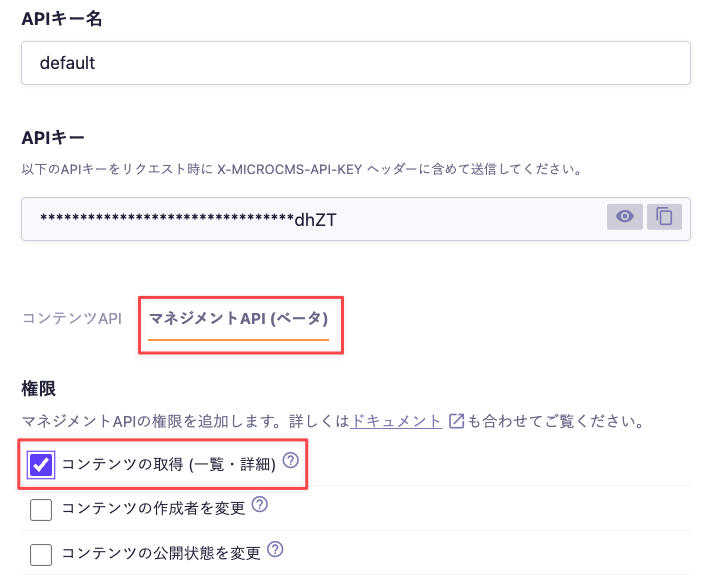
Please enable the default permission "Retrieve Content (List/Detail)" for the Management API and include it in the request headers when sending.

cautionCaution

If the X-MICROCMS-API-KEY is identifiable, it may allow unauthorized manipulation of content by third parties. Please handle it with care. For more details, please refer to "API Key (API Authentication and Authorization Management)".

Response Body

Here is an example of the response for the list of contents obtained from the Management API.

{
  "contents": [
    {
      "id": "contentId",
      "createdAt": "2019-08-24T14:15:22Z",
      "updatedAt": "2019-08-24T14:15:22Z",
      "publishedAt": "2019-08-24T14:15:22Z", 
      "revisedAt": "2019-08-24T14:15:22Z",
      "closedAt": null,
      "status": [
        "DRAFT"
      ],
      "customStatus": null, 
      "draftKey": "draftKey",
      "createdBy": "681dcd71-b7b9-4149-b45b-5e96eb51fecf",
      "updatedBy": "681dcd71-b7b9-4149-b45b-5e96eb51fecf",
      "reservationTime": {
        "publishTime": "2019-08-24T14:15:22Z", 
        "stopTime": "2019-08-24T14:15:22Z"
      }
    }
  ],
  "totalCount": 1,
  "offset": 0,
  "limit": 10
}

About contents

The values of the retrieved contents are returned in an array calledcontents. The objects withincontents include the following items.

Value

Description

id

The ID of the content.

createdAt

The date and time when the content was created.

updatedAt

The date and time when the content was last updated.

publishedAt

The date and time when the content was published. If it has never been published, null will be present.

revisedAt

The date and time when the currently published content was updated. If it has never been published, null will be present.

draftKey

The draft key (draftKey) that can be obtained from the management screen. It will be null during content publication and expiration.

closedAt

The date and time when the publication ended. If it has never been closed, null will be present.

status

The status of the content. It can be one of DRAFT, PUBLISH, CLOSED, or PUBLISH_AND_DRAFT.

customStatus

The information of the custom status that has been set. If not set, null will be present. For details, please refer to "Custom Status".

createdBy

The ID of the member who created the content.

updatedBy

The ID of the member who last edited the content.

reservationTime

The information regarding the reservation for publication start and end.

If neither publication start nor end reservation is set, null will be present.

If either publication start reservation or publication stop reservation is set, it will include publishTime and stopTime. The one with a reservation will have a date and time, while the one without will have null.

Example: If only the publication start reservation is set

"reservationTime": { "publishTime": "2024-12-25T06:45:00Z", "stopTime": null }

Values Obtainable Only via the Management API

The values specific to the Management API contained within the contents object are as follows. These values are not included in the Content API.

  • closedAt
  • status
  • customStatus
  • createdBy
  • updatedBy
  • reservationTime

Query String

This API allows you to specify a query string.

limit

Specifies the number of items to retrieve.
The default value is 10. The maximum value is 100.

informationInformation
  • An error occurs when the response size (the value of content-length in the response header) exceeds approximately 5MB.
  • If you want to retrieve more than 101 items, such as when fetching all items, please refer to the help below.

offset

Shifts the starting position for content retrieval back by the specified value.
The default value is 0.

Custom Status

For content with a custom status set, the customStatus will be included in the response as follows.

{
  "id": "contentId",
  "createdAt": "2019-08-24T14:15:22Z",
  "updatedAt": "2019-08-24T14:15:22Z",
  "publishedAt": "2019-08-24T14:15:22Z",
  "revisedAt": "2019-08-24T14:15:22Z",
  "status": [
    "PUBLISH"
  ],
  // This customStatus will be newly added.
  // If customStatus is not supported by the plan or not set, it will be null.
  "customStatus": [
    {
      "key": "USER_DEFINED_CUSTOM_STATUS_KEY123",
      "description": "This is a user-defined custom status.",
      "name": "Custom Status Test",
      "behaviour": "PUBLISH",
      "color": "#a20063",
      "createdAt": "2019-08-24T14:15:22Z",
      "updatedAt": "2019-08-24T14:15:22Z"
    }
  ],
  "draftKey": "draftKey",
  "createdBy": "681dcd71-b7b9-4149-b45b-5e96eb51fecf",
  "updatedBy": "681dcd71-b7b9-4149-b45b-5e96eb51fecf",
  "reservationTime": {
    "publishTime": "2019-08-24T14:15:22Z",
    "stopTime": "2019-08-24T14:15:22Z"
  }
}


For more details about custom status, please refer to the documentation below.