POST /api/v1/media
This is an API that allows you to upload images to the service.
Specifications
- The uploadable media formats are images and files (media other than images).
Information
File uploads are a feature available in the Team, Business, and Enterprise plans.
For details on the features available for each plan, please refer to the pricing page.
- The maximum file size for uploads is 5MB. Images or files exceeding this size limit should be uploaded via the management screen.
- Only 1 file can be uploaded per request.
Request Headers
X-MICROCMS-API-KEY
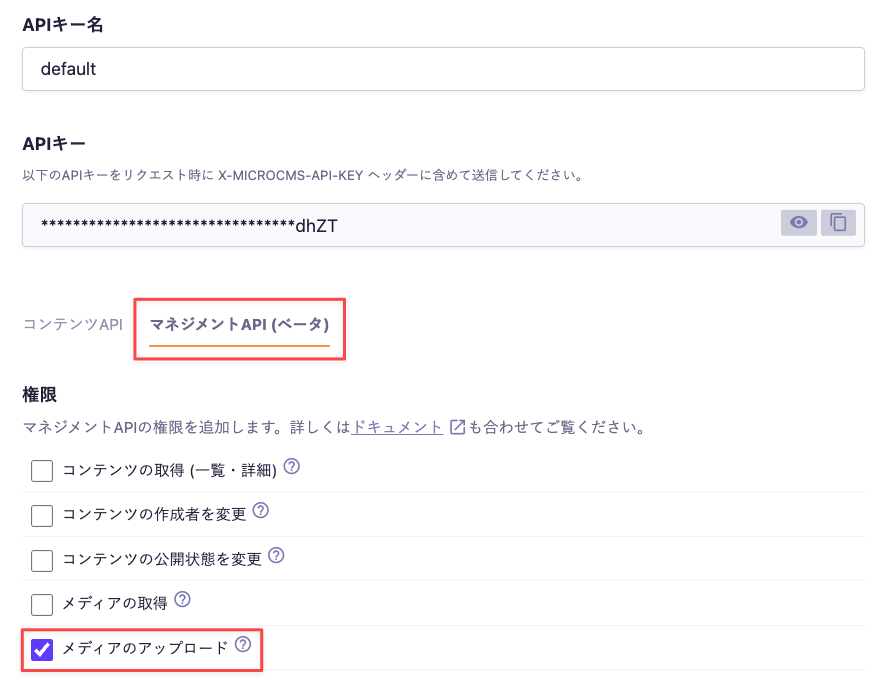
This is the authentication key required for API requests.
Enable "Media Upload" with management API permissions and include it in the request headers when sending.

Caution
If the X-MICROCMS-API-KEY is identifiable, it may allow unauthorized manipulation of content by third parties. Please handle it with care. For more details, please refer to "API Key (API Authentication and Authorization Management)".
Content-Type
Specifies the format of the data to be sent.multipart/form-data; boundary=--[any value (boundary)] should be specified.
Request Body
--[any value (boundary)]
Content-Disposition: form-data; name="file"; filename="[file name]"
Content-Type: [file MIME type]
[file binary data]
--[any value (boundary)]Request Example
This is an example of a request using curl.
// Image
curl -X POST -H 'X-MICROCMS-API-KEY: [API key]' -F "file=@sample.jpg" https://[service ID].microcms-management.io/api/v1/media
// File
curl -X POST -H 'X-MICROCMS-API-KEY: [API key]' -F "file=@sample.txt" https://[service ID].microcms-management.io/api/v1/mediaResponse
If the image is created successfully, a 201 response will be returned.
Response Body
// Image
{"url":"https://images.microcms-assets.io/assets/xxx/yyy/sample.jpg"}
// File
{"url":"https://files.microcms-assets.io/assets/xxx/yyy/sample.txt"}