microCMS
Documentation
  • Pricing
  • Blog
  • FAQ
  • Contact
  • Sign In
  • Get started for free
Navigation
Tutorial
Next.js
  • Integration with Next.js
  • Getting Started with App Router
  • Tutorial (App Router)
  • Getting Started with Pages Router
  • Tutorial (Pages Router)
Astro
  • Getting Started
  • Integration with Astro
  • Tutorial
Nuxt
  • Integration with Nuxt
  • Getting Started
  • Tutorial
Gatsby
  • Integration with Gatsby
  • Getting Started
  • Tutorial
JavaScript
  • Integration with JavaScript
  • Getting Started (Browser)
  • Getting Started (Server)
PHP
  • Integration with PHP
  • Getting Started
Ruby
  • Integration with Ruby
  • Getting Started
Go
  • Integration with Go
  • Getting Started with microCMS
Manual
  • Introduction
Account & Login
  • Account Registration
  • Login
  • Email Address Authentication
Services
  • Creating a Service
  • Service Configuration
  • Template
  • Service Deletion
Payment
  • Change of Pricing Plan
  • Registering and Changing Payment Methods
API
  • Creating and Managing APIs
  • API Settings
  • Export/Import of API Schema
Fields
  • Text Field
  • Text Area
  • Image
  • Multiple Images
  • Date
  • Boolean
  • Selectable Field
  • Content Reference
  • Multiple Content References
  • Number
  • File
  • Extended Field
  • Repetition
  • Custom
Contents
  • CSV Export of Content
  • Content Creation
  • Content Editing
  • Content Management
  • View
  • Content Status
  • Custom Status
  • Setting the Content ID
  • Automatically Assigned Values for Content
  • CSV Import of Content
  • API Preview
  • Examples of Using Query Parameters with API Preview
  • Integration Methods by Rendering Type
  • Screen Preview
  • Setting Up Webhooks for Content
Rich Editor
  • How to Use the Rich Editor
  • Rich Editor WRITE API
  • How to Use the Old Rich Editor
Reviews
  • Review
  • AI Review
Media
  • Media Management
  • Changing Media Filters and Display Order
  • Media Tag Configuration
  • Setting Up Media Webhooks
  • Custom Domain Settings for Media
Permission Management
  • Member Management
  • Roles (Permission Management in the Admin Panel)
Environments
  • Multiple Environments (Development Environment)
  • Merging API Settings Between Environments
Connection
  • Amazon S3 Integration
Logs
  • Audit Log
  • Data Transfer Volume
Security
  • Content Update History
  • IP Restrictions for Management Dashboard
  • IP Restrictions for APIs
Authentication
  • Setting Up Two-Factor Authentication
  • Mandatory Two-Factor Authentication
  • Single Sign-On
Specifications & Limitations
  • Recommended Environment
  • Limitations / Precautions
Content API
  • What is the Content API?
Basic Operations
  • GET /api/v1/{endpoint}
  • GET /api/v1/{endpoint}/{content_id}
  • POST /api/v1/{endpoint}
  • PUT /api/v1/{endpoint}/{content_id}
  • PATCH /api/v1/{endpoint}/{content_id}
  • DELETE /api/v1/{endpoint}/{content_id}
API Keys
  • API Key (API Authentication and Authorization Management)
  • Migration from the Old API (X-API-KEY, etc.)
Responses & Error Handling
  • Response format for each field in the GET API
  • Specifying Query Parameters in the GET API
  • Error Responses of the Content API
Management API (Beta)
  • POST /api/v1/roles
  • DELETE /api/v1/roles/{role_id}
  • GET /api/v1/roles/{role_id}
  • PATCH /api/v1/roles/{role_id}
  • GET /api/v1/roles
  • What is the Management API?
Content Operations
  • PUT /api/v1/contents/{endpoint}/{content_id}/reservation
  • GET /api/v1/contents/{endpoint}
  • GET /api/v1/contents/{endpoint}/{content_id}
  • PATCH /api/v1/contents/{endpoint}/{content_id}/status
  • PATCH /api/v1/contents/{endpoint}/{content_id}/createdBy
Media Operations
  • GET /api/v2/media
  • GET /api/v1/media
  • POST /api/v1/media
  • DELETE /api/v2/media
Member Operations
  • PATCH /api/v1/members/{member_id}
  • GET /api/v1/members
  • GET /api/v1/members/{member_id}
API Operations
  • POST /api/v1/apis
  • GET /api/v1/apis
  • GET /api/v1/apis/{endpoint}
Service Operations
  • GET /api/v1/service
Responses & Error Handling
  • Management API Error Responses
Image API
  • What is the Image API?
Parameters
  • Image Size
  • Quality
  • Resolution and Screen Size
  • Format
  • Text
  • Border
  • Padding
  • Shape
  • Download
  • Watermark
MCP Server
  • microCMS MCP
  • microCMS Document MCP Server
  • Top
  • Management API (Beta)

GET /api/v1/media

Last updated: 2026/11/19

This is an API that allows you to retrieve media information included in the service.

Information

Starting from December 2023, we will provide a new endpoint for retrieving media information (GET api/v2/media). We recommend using this in the future.

Caution

We have confirmed a known issue where if you try to retrieve more than 10,000 media items (by setting the offset to a value greater than 10,000), the data cannot be retrieved correctly.

To retrieve media information exceeding 10,000 items, please use GET /api/v2/media.

Request Header

X-MICROCMS-API-KEY

This is the authentication key required for GET API requests.
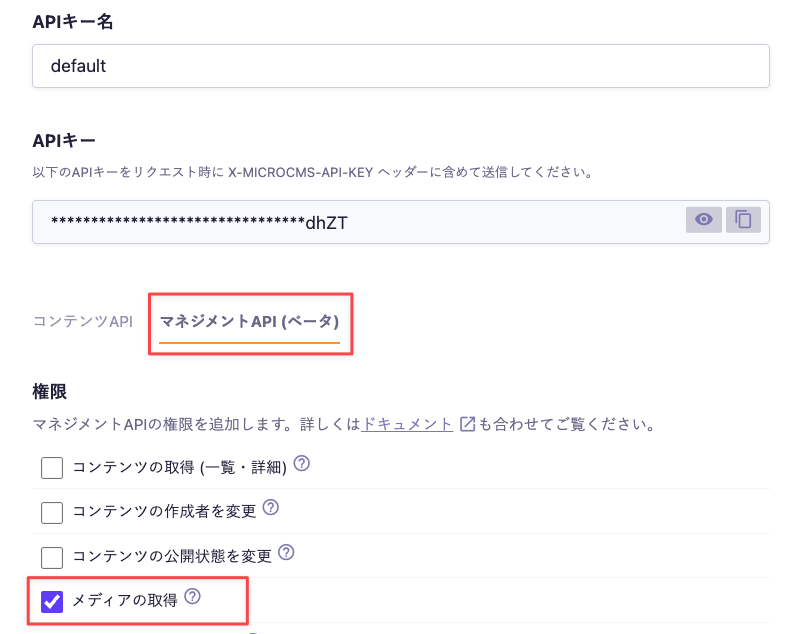
Please enable "Retrieve Media" with the default permissions of the Management API and include it in the request header when sending.
Caution

If the X-MICROCMS-API-KEY is identifiable, it may allow unauthorized manipulation of content by third parties. Please handle it with care. For more details, please refer to "API Key (API Authentication and Authorization Management)".

Response Example

This is an example of the response for the media list obtained from the Management API.

{
  "media": [
    {
      "id": "e803c1fa-368d-4087-b937-646db9f6e328",
      "url": "https://images.microcms-assets.io/assets/9895824867684c2994e22452171b8c11/test.png",
      "width": 591,
      "height": 138
    },
    {
      "id": "52d27e9a-5ada-4c22-9fe9-df2dec7ca1fd",
      "url": "https://images.microcms-assets.io/assets/9895824867684c2994e22452171b8c11/d7bcc402720f471f9f36de5eca4057c5/example.png",
      "width": 808,
      "height": 177
    }
  ],
  "totalCount": 8,
  "limit": 2,
  "offset": 0
}


Query Parameters

This API allows you to specify parameters.

limit

Specifies the number of items to retrieve.
The default value is 10. The maximum value is 100.

Information
  • An error occurs when the response size (the value of content-length in the response header) exceeds approximately 5MB.
  • If you want to retrieve more than 101 items, such as when fetching all items, please refer to the help below.
101件以上のコンテンツを取得するにはどうしたらよいですか?
https://help.microcms.io/ja/knowledge/fetch-big-data

offset

Shifts the starting position for content retrieval back by the specified value.
The default value is 0.

imageOnly

This parameter is used when you want to retrieve only images, excluding files such as videos and PDFs.
To retrieve only images, specify true.
The default value is false.

Error Responses

See Management API Error Responses.

Contents

  • Request Header
  • X-MICROCMS-API-KEY
  • Response Example
  • Query Parameters
  • limit
  • offset
  • imageOnly
  • Error Responses
  • Company
  • Legal Notice
  • Terms of Service
  • Privacy Policy

Copyright © microcms.io All rights reserved.