This is the API for creating APIs for the Service.
The main specifications regarding the API format, input limits, and contract plans are as follows.
list (list format) or object (object format).Item | Constraints |
|---|---|
API Name | Specify a name that can be identified within the Service. |
Endpoint | Specify a unique value within the Service. The same value as an existing API cannot be used. |
Number of Fields |
|
allowAdditionalCharge=true as mentioned later.Requests and responses will use a common format as when obtaining the API schema. Therefore, you can create APIs for other services or environments based on the obtained API schema.
For the Management API to obtain the API schema, please check “GET /api/v1/apis/{endpoint}”.
This is the authentication key required for API requests.
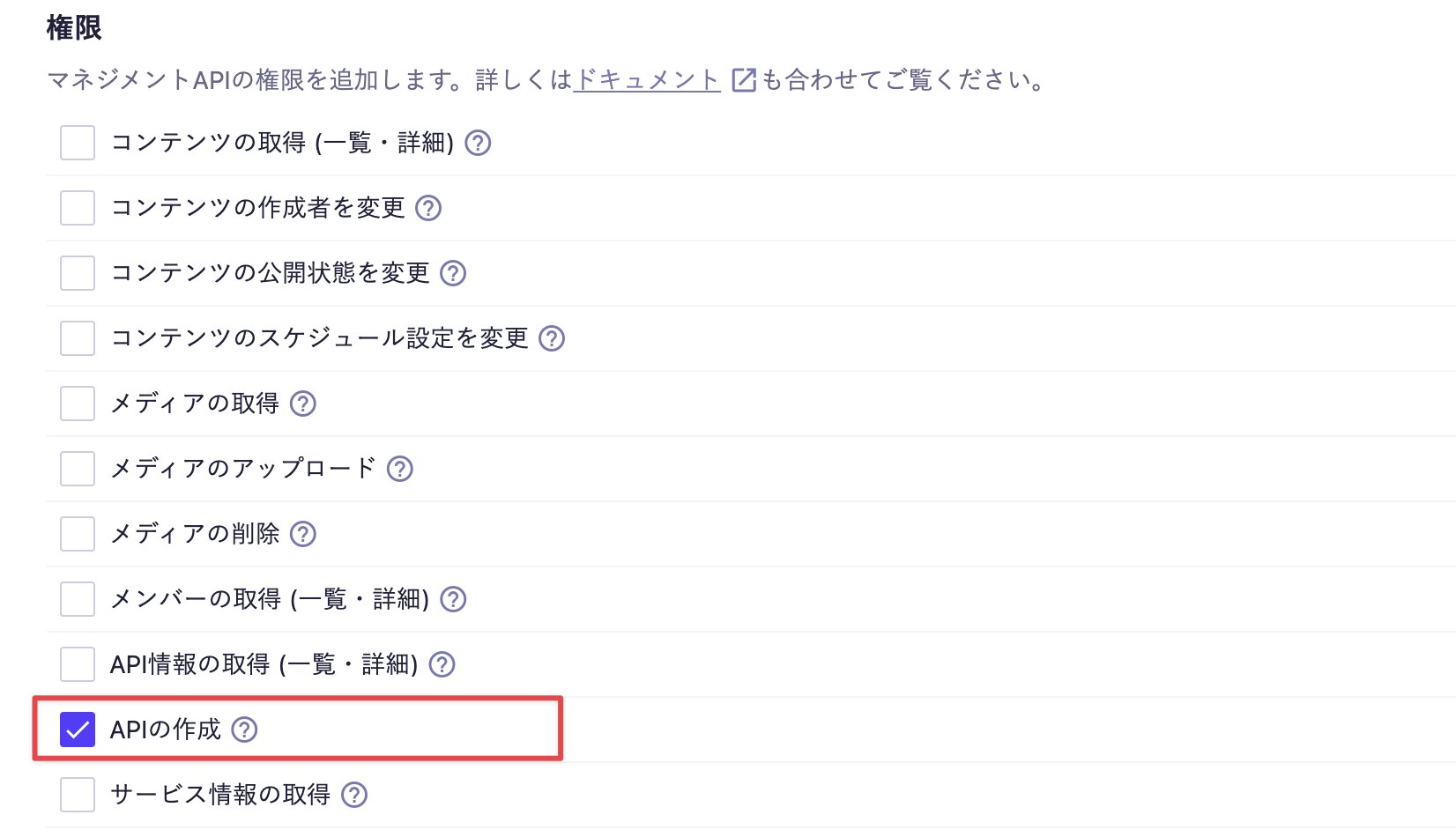
Please enable "Create API" permission in the Management API and include it in the request headers when sending.
If the X-MICROCMS-API-KEY is identifiable, it may allow unauthorized manipulation of content by third parties. Please handle it with care. For more details, please refer to "API Key (API Authentication and Permission Management)".
Specifies the format of the data being sent.
Since microCMS only handles data in JSON format, please specify application/json.
Specifies whether to allow the creation of APIs with additional charges when the number of APIs reaches the limit of the Service Plan. This feature is available on the Team plan, Business plan, and Enterprise plan.
Value | Description |
|---|---|
| Does not allow creation with additional charges. This is the default value when the parameter is omitted. |
| Allows API creation with additional charges. Available on the Team plan, Business plan, and Enterprise plan. |
If creating an API exceeds the limit of the contracted plan, the Team plan, Business plan, and Enterprise plan will return 402 Payment Required unless allowAdditionalCharge=true is specified.
For the Hobby plan and Template plan, 403 Forbidden will be returned regardless of the value specified for allowAdditionalCharge.
Specify the basic information of the API, API fields, and custom fields as needed.
Property | Type | Required | Description |
|---|---|---|---|
| string | Required | This is the API name. It should be specified with 1 to 300 characters. |
| string | Required | This is the API endpoint. It should be specified with 3 to 32 characters consisting of lowercase letters, numbers, hyphens ( |
| string | Required | This is the format of the API. Specify either |
| array | Required | For details, please refer to apiFields below. |
| array | Optional | This is the definition of custom fields. Specify it when using fields of type |
If unknown properties or properties that cannot be used with each field type are specified, a 400 Bad Request will be returned.
apiFields specifies the fields to be created in the API as an array.
In the following sections, we will explain the properties and constraints that can be specified in the JSON for each field type.
All fields have common properties in their JSON.
{
 "fieldId": "title",
 "name": "Title",
 "kind": "text",
 "description": "Description",
 "required": true
}Property | Setting Item | Type | Required | Specifications/Constraints |
|---|---|---|---|---|
| Field ID | string | Required |
|
| Display Name | string | Required | 1 to 100 characters |
| Field Type | enum | Required | Refer to "Values that can be specified for the kind property and corresponding fields" for allowable values and corresponding fields |
| Description | string | null | Optional |
|
| Required Setting | boolean | Optional | - |
Value of kind | Field | Document |
|---|---|---|
| Text Field | |
| Text Area | |
| Rich Text Editor | |
| Image | |
| Multiple Images | |
| File | |
| Date | |
| Number | |
| Boolean | |
| Selectable Field | |
| Content Reference | |
| Multiple Content References | |
| Extended Field | |
| Custom | |
| Repeat |
{
  "fieldId": "title",
  "name": "Title",
  "kind": "text",
 "description": "This is the title of the article",
  "required": true,
  "isUnique": false,
  "patternMatchValidation": {
    "regexp": { "pattern": "^[A-Za-z0-9]+$", "flags": "gi" }
  },
  "textSizeLimitValidation": {
    "textSize": { "min": 1, "max": 50 }
  },
  "initialValue": "Initial value text"
}
Property | Setting Item | Type | Required | Specifications/Constraints |
|---|---|---|---|---|
| Do not allow duplicates (unique) | boolean | Optional | Can be set to |
| Allow input of only specific patterns | object | null | Optional | - |
| Pattern | string | Optional |
|
| Flags | string | null | Optional |
|
| Limit the number of characters | object | null | Optional | If setting a limit, at least one of |
| Minimum | number | null | Optional |
|
| Maximum | number | null | Optional |
|
| Initial Value | string | null | Optional |
|
{
  "fieldId": "body",
  "name": "Body",
  "kind": "textArea",
 "description": "This is the body of the article",
  "required": true,
  "patternMatchValidation": {
    "regexp": { "pattern": "^[A-Za-z0-9]+$", "flags": "gi" }
  },
  "textSizeLimitValidation": {
    "textSize": { "min": 0, "max": 1000 }
  },
 "initialValue": "Initial body text"
}
Property | Setting Item | Type | Required | Specifications/Constraints |
|---|---|---|---|---|
| Allow input for specific patterns only | object | null | Optional | - |
| Pattern | string | Optional |
|
| Flags | string | null | Optional |
|
| Limit the number of characters | object | null | Optional | When setting a limit, specify a value for at least one of |
| Minimum | number | null | Optional |
|
| Maximum | number | null | Optional |
|
| Initial Value | string | null | Optional |
|
{
  "fieldId": "editor",
  "name": "Rich Text Editor",
  "kind": "richEditorV2",
  "description": "This is the body of the article",
  "required": true,
  "richEditorV2Options": ["paragraph", "bold", "link", "image", "color", "size"],
  "richEditorV2ColorList": [{ "id": "f7Kp_2mQx9", "value": "rgb(255, 0, 0)" }],
  "richEditorV2HideColorPicker": false,
  "richEditorV2FontSizeList": [{ "id": "a9X-3vLmQ2", "name": "Large", "value": "120" }],
  "customClassList": [{ "id": "N4cR_8zTp1", "name": "Note", "value": "note" }]
}
Property | Setting Item | Type | Required | Specifications/Constraints |
|---|---|---|---|---|
| Edit Toolbar | enum[] | Optional |
|
| Color Presets | object[] | Optional | Up to 20 items |
| Internal Identifier | string | Optional |
|
| Color | string | Conditionally Required |
|
| Show only color presets and hide the color picker | boolean | Optional | If set to true, at least one |
| Font Size Presets | object[] | Optional | Up to 20 items |
| Internal Identifier | string | Optional |
|
| Display Name | string | Conditionally Required |
|
| Size (%) | string | Conditionally Required |
|
| Custom Class | object[] | Optional | - |
| Internal Identifier | string | Optional |
|
| Display Name | string | Conditionally Required |
|
| Class Name | string | Conditionally Required |
|
Value | Decoration/Function |
|---|---|
| Heading 1 |
| Heading 2 |
| Heading 3 |
| Heading 4 |
| Heading 5 |
| Paragraph |
| Bold |
| Italic |
| Underline |
| Strikethrough |
| Inline Code |
| Quote |
| Code Block |
| Bullet List |
| Numbered List |
| Link |
| Image |
| File |
| Table |
| Horizontal Rule |
| Embed (OEmbed) |
| Text Alignment |
| Custom Class |
| Text Color |
| Text Size |
undo, redo, and clean are always valid fixed items and cannot be specified in richEditorV2Options. If specified, a 400 Bad Request will be returned. They are also not included in the response for GET and successful creation.
{
  "fieldId": "thumbnail",
  "name": "Thumbnail",
  "kind": "media",
  "description": "This is the thumbnail image for the article",
  "required": true,
  "imageSizeValidation": { "imageSize": { "width": 600, "height": 400 } },
  "initialValue": "https://images.microcms-assets.io/assets/xxxxxxxxxxxxxxxxxxxxxxxxxxxxxxxx/yyyyyyyyyyyyyyyyyyyyyyyyyyyyyyyy/image.jpg"
}
Property | Setting Item | Type | Required | Specifications/Constraints |
|---|---|---|---|---|
| Image Size Limit | object | null | Optional | If setting a limit, at least one of |
| width | number | null | Optional | Integer greater than or equal to 1 |
| height | number | null | Optional | Integer greater than or equal to 1 |
| Initial Value | string | null | Optional |
|
{
  "fieldId": "gallery",
  "name": "Gallery",
  "kind": "mediaList",
  "description": "Select multiple images for the gallery used in the article",
  "required": false,
  "mediaListLayout": "GRID_3",
  "imageSizeValidation": { "imageSize": { "width": 400, "height": 600 } },
  "initialValue": [
    "https://images.microcms-assets.io/assets/xxxxxxxxxxxxxxxxxxxxxxxxxxxxxxxx/yyyyyyyyyyyyyyyyyyyyyyyyyyyyyyyy/image-01.jpg",
    "https://images.microcms-assets.io/assets/xxxxxxxxxxxxxxxxxxxxxxxxxxxxxxxx/yyyyyyyyyyyyyyyyyyyyyyyyyyyyyyyy/image-02.jpg"
  ]
}
Property | Setting Item | Type | Required | Specifications/Constraints |
|---|---|---|---|---|
| Layout | enum | Optional |
|
| Image Size Limit | object | null | Optional | To set a limit, at least one of |
| width | number | null | Optional | Integer greater than or equal to 1 |
| height | number | null | Optional | Integer greater than or equal to 1 |
| Initial Value | string[] | Optional |
|
Value | Layout |
|---|---|
| Horizontal (Scroll) |
| Horizontal (2 Columns) |
| Horizontal (3 Columns) |
| Horizontal (4 Columns) |
The File Field is available in the Team plan, Business plan, and Enterprise plan. It is not available in the Hobby plan.
{
  "fieldId": "attachment",
  "name": "Attached File",
  "kind": "file",
  "description": "File to be downloaded within the article",
  "required": false,
  "initialValue": "https://files.microcms-assets.io/assets/xxxxxxxxxxxxxxxxxxxxxxxxxxxxxxxx/yyyyyyyyyyyyyyyyyyyyyyyyyyyyyyyy/sample.pdf"
}
Property | Setting Item | Type | Required | Specifications/Constraints |
|---|---|---|---|---|
| Initial Value | string | null | Optional |
|
{
  "fieldId": "eventDate",
  "name": "Event Date and Time",
  "kind": "date",
  "description": "The date of the content",
  "required": false,
  "dateFormat": true,
  "initialValue": "2026-07-03T09:00:00.000Z"
}
Property | Setting Item | Type | Required | Specifications/Constraints |
|---|---|---|---|---|
| Date only | boolean | Optional |
|
| Initial Value | string | null | Optional |
|
{
  "fieldId": "price",
  "name": "Price",
  "kind": "number",
  "description": "The price of the product",
  "required": false,
  "numberSizeLimitValidation": { "numberSize": { "min": 100, "max": 10000 } },
  "initialValue": 10000
}
Property | Setting Item | Type | Required | Specifications/Constraints |
|---|---|---|---|---|
| Limit numeric values | object | null | Optional | If setting a limit, specify a value for at least one of |
| Minimum | number | null | Optional |
|
| Maximum | number | null | Optional |
|
| Initial Value | number | null | Optional |
|
{
  "fieldId": "isActive",
  "name": "Active",
  "kind": "boolean",
  "description": "This is a boolean value",
  "required": false,
  "initialValue":true
}
Property | Setting Item | Type | Required | Specifications/Constraints |
|---|---|---|---|---|
| Initial Value | boolean | Optional | - |
{
  "fieldId": "category",
  "name": "Category",
  "kind": "select",
 "description": "This is the category of the article.",
  "required": true,
  "selectItems": [
    { "id": "0HGv33ahx5", "value": "News" },
    { "id": "9zB0S7w-HU", "value": "Blog" }
  ],
  "multipleSelect": false,
  "initialValue": ["9zB0S7w-HU"]
}
Property | Setting Item | Type | Required | Specifications/Constraints |
|---|---|---|---|---|
| Options | object[] | Required | Empty array is allowed |
| Internal Identifier | string | Optional |
|
| Value of the Option | string | Conditionally Required | Required if |
| Multiple Selection | boolean | Required | Set to |
| Initial Value | string[] | Optional |
|
{
  "fieldId": "category",
  "name": "Category",
  "kind": "relation",
  "description": "The category associated with the article",
  "required": false,
  "referencedApiEndpoint": "categories",
  "listViewFieldId": "title"
}
Property | Setting Item | Type | Required | Specifications/Constraints |
|---|---|---|---|---|
| Referenced API | string | Required |
|
| Item to display in the list view | string | Optional |
|
{
  "fieldId": "relatedArticles",
  "name": "Related Articles",
  "kind": "relationList",
 "description": "Related articles linked to the article",
 "required": false,
  "relationListCountLimitValidation": {
    "relationListCount": { "min": 1, "max": 4 }
  },
  "referencedApiEndpoint": "articles",
  "listViewFieldId": "title"
}
Property | Setting Item | Type | Required | Specifications/Constraints |
|---|---|---|---|---|
| Limit the number of multiple content references | object | null | Optional | If setting a limit, specify a value for at least one of |
| Minimum | number | null | Optional |
|
| Maximum | number | null | Optional |
|
| Referenced API | string | Required |
|
| Item displayed in the list view | string | Optional |
|
{
  "fieldId": "embed",
  "name": "Embed",
  "kind": "iframe",
  "description": "An extended field that integrates with external tools",
  "required": false,
  "iframeUrl": "https://example.com/embed"
}
Property | Setting Item | Type | Required | Specifications/Constraints |
|---|---|---|---|---|
| Extended Field URL | string | Required | A string in URL format with http or https scheme, including the host |
Links the data defined in customFields.
{
  "fieldId": "authorProfile",
  "name": "Author Profile",
  "kind": "custom",
  "description": "This is a custom field for entering the author profile.",
  "required": false,
  "customFieldId": "profile",
  "listViewFieldId": "name"
}
Property | Setting Item | Type | Required | Specifications/Constraints |
|---|---|---|---|---|
| Target custom field | string | Required | Specify the |
| Item to display on the list view | string | Optional |
|
Multiple selections of data defined in customFields can be linked.
{
  "fieldId": "items",
  "name": "Section",
  "kind": "repeater",
  "description": "You can repeatedly enter blocks such as headings and body text.",
  "required": false,
  "customFieldIds": [
    "headingBlock",
    "bodyBlock"
  ],
  "repeaterCountLimitValidation": {
    "repeatCount": { "min": 1, "max": 10 }
  }
}
Property | Setting Item | Type | Required | Specifications/Constraints |
|---|---|---|---|---|
| Target custom fields | string[] | Required |
|
| Limit the number of repeating fields | object | null | Optional | If setting a limit, specify a value for at least one of |
| Minimum | number | Optional |
|
| Maximum | number | Optional |
|
initialValue does not match the field type, a 400 Bad Request will be returned indicating the relevant field and property.initialValue itself. Whether null can be specified depends on the property.initialValue must also meet those conditions. If it does not satisfy conditions such as character count, regular expressions, or numerical ranges, a 400 Bad Request will be returned.Property | Setting Item | Type | Required | Specifications/Constraints |
|---|---|---|---|---|
| Custom Field ID | string | Required |
|
| Display Name | string | Required | Specify with 1 to 300 characters |
| Field Definition | object[] | Required | At least one must be specified. The settings for each field are the same as apiFields |
| Layout within Custom Fields | string[][] | Required | Display position of each field. For details, refer to "How to Specify Layout" |
Single Column Layout
To arrange all fields in a single vertical column, include only one array.
"fieldOrderByColumn": [
  ["field01", "field02", "field03"]
]The first array corresponds to the left column, and the second array corresponds to the right column.
"fieldOrderByColumn": [
  ["field01", "field02"], // Displayed on the left
  ["field03"]             // Displayed on the right
]fieldId included in fields without duplication or omission.customFields can specify up to 99 items.kind is custom, specify customFieldId; if repeater, specify customFieldIds with the same request's customFields[].fieldId.customFields for customFieldId or customFieldIds, a 400 Bad Request will be returned.customFields[].fields. An empty array cannot be specified.custom within a custom field.customFields[].fields[], you cannot specify isUnique: true. Only false or omitting the key is allowed.Below is an example of creating a list-type API.
curl -X POST "https://[Service ID].microcms-management.io/api/v1/apis" \
 -H "X-MICROCMS-API-KEY: [API Key]" \
 -H "Content-Type: application/json" \
 -d '{
     "name": "Blog",
     "endpoint": "blog",
     "type": "list",
     "apiFields": [
         {
             "fieldId": "title",
             "name": "Title",
             "kind": "text",
             "required": true,
             "initialValue": "Untitled"
         },
         {
             "fieldId": "price",
             "name": "Price",
             "kind": "number",
             "initialValue": 1000
         },
         {
             "fieldId": "published",
             "name": "Published",
             "kind": "boolean",
             "initialValue": true
         },
         {
             "fieldId": "thumbnail",
             "name": "Thumbnail",
             "kind": "media",
             "initialValue": "https://images.microcms-assets.io/assets/xxxx/yyyy/sample.png"
         }
     ]
}'curl -X POST "https://[Service ID].microcms-management.io/api/v1/apis" \
-H "X-MICROCMS-API-KEY: [API Key]" \
-H "Content-Type: application/json" \
-d '{
"name": "Product Introduction",
"endpoint": "products",
"type": "list",
"apiFields": [
{
"fieldId": "productName",
"name": "Product Name",
"kind": "text",
"required": true,
"isUnique": true
},
{
"fieldId": "seo",
"name": "SEO Settings",
"kind": "custom",
"customFieldId": "seoSettings"
},
{
"fieldId": "faq",
"name": "Frequently Asked Questions",
"kind": "repeater",
"customFieldIds": ["faqItem"],
"repeaterCountLimitValidation": {
"repeatCount": {
"min": 1,
"max": 20
}
}
}
],
"customFields": [
{
"fieldId": "seoSettings",
"name": "SEO Settings",
"fields": [
{
"fieldId": "metaTitle",
"name": "Meta Title",
"kind": "text",
"required": true
},
{
"fieldId": "metaDescription",
"name": "Description",
"kind": "textArea"
}
],
"fieldOrderByColumn": [
["metaTitle"],
["metaDescription"]
]
},
{
"fieldId": "faqItem",
"name": "FAQ Item",
"fields": [
{
"fieldId": "question",
"name": "Question",
"kind": "text",
"required": true
},
{
"fieldId": "answer",
"name": "Answer",
"kind": "richEditorV2",
"richEditorV2Options": ["bold", "link", "listBullet"]
}
],
"fieldOrderByColumn": [
["question"],
["answer"]
]
}
]
}'If the API is created successfully, 201 Created will be returned.
The response body will be the schema of the created API, returned in the same format as when retrieving the API schema.
Each element of apiFields and customFields[].fields will include all properties corresponding to the field type. Properties omitted during the request will also be returned with default values or null.
{
  "name": "Blog",
  "endpoint": "blog",
  "type": "list",
  "apiFields": [
    {
      "fieldId": "title",
      "name": "Title",
      "kind": "text",
      "description": null,
      "required": true,
      "textSizeLimitValidation": null,
      "patternMatchValidation": null,
      "isUnique": false,
      "initialValue": "Untitled"
    },
    {
      "fieldId": "price",
      "name": "Price",
      "kind": "number",
      "description": null,
      "required": false,
      "numberSizeLimitValidation": null,
      "initialValue": 1000
    },
    {
      "fieldId": "published",
      "name": "Published",
      "kind": "boolean",
      "description": null,
      "required": false,
      "initialValue": true
    },
    {
      "fieldId": "thumbnail",
      "name": "Thumbnail",
      "kind": "media",
      "description": null,
      "required": false,
      "imageSizeValidation": null,
      "initialValue": "https://images.microcms-assets.io/assets/xxxx/yyyy/sample.png"
    }
  ],
  "customFields": []
}
Status Code | Description |
|---|---|
| The API has been successfully created. |
| The request body is invalid. It may include missing required fields, type mismatches, unknown properties, or properties that do not correspond to the field types. |
| You have reached the API limit for your subscription plan. To allow creation with additional charges, specify |
| The API Key does not have permission to create APIs, or it includes field types that are not available in your subscription plan. |
| An API with the same endpoint already exists. |
For example, if a number is specified in the initialValue of the text field, the following response will be returned.
{ "message": "field \"title\": \"initialValue\" must be of type string" }