microCMS

Setting the Content ID

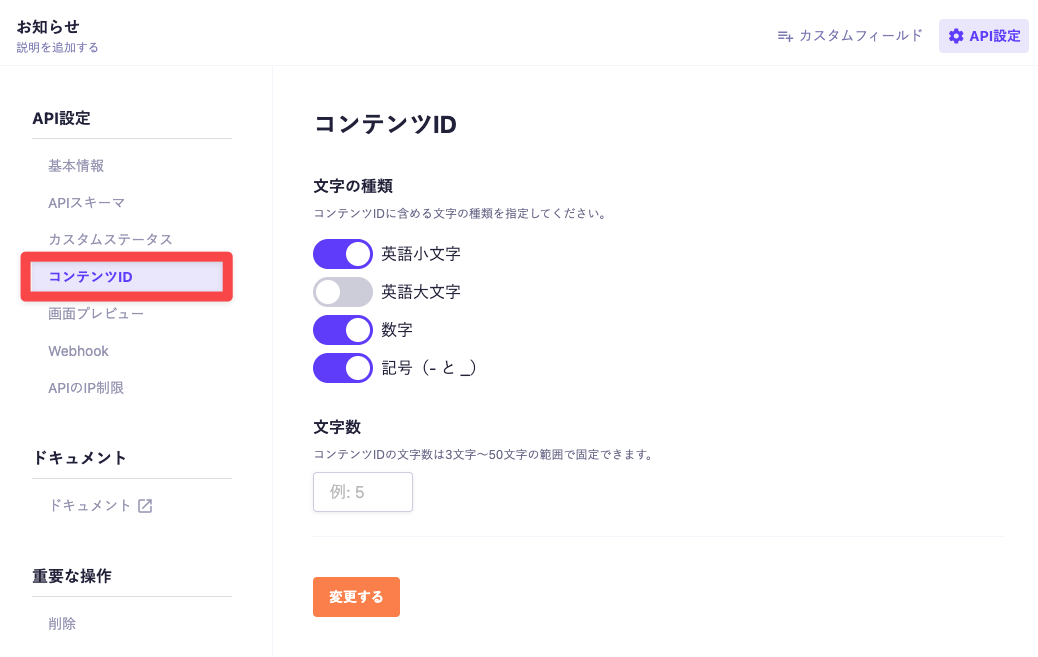
The format of the content ID can be configured for each API. The configuration location is "API Settings" → "Content ID".

Configuration Items

There are two main items that can be configured (characters, character count).

Characters

You can choose the types of characters included in the content ID from the following four types:

  • Lowercase English letters (a ~ z)
  • Uppercase English letters (A ~ Z)
  • Numbers (0 ~ 9)
  • Symbols ( - and _ )

Character Count

The character count of the content ID can be fixed between 3 and 50 characters. If no specification is made, there will be no limit on the character count.

cautionCaution

Please note that the settings for the content ID will not apply to content created before the settings were configured.

The configured format will only apply to content created after the settings have been made or to operations that change the content ID.

Where Content ID Settings Are Applied

The settings are mainly reflected in the following areas.

Cases of Automatic Generation

  • When creating new content
  • When using the POST API
  • During CSV import (when Content ID is not specified)

Cases Where Format Verification Is Performed

  • When changing the Content ID
  • When using the PUT API
  • During CSV import (when Content ID is specified)
cautionCaution

If the content ID format is invalid, the operation will result in an error.