microCMS
Documentation
  • Pricing
  • Blog
  • FAQ
  • Contact
  • Sign In
  • Get started for free
Navigation
Tutorial
Next.js
  • Integration with Next.js
  • Getting Started with App Router
  • Tutorial (App Router)
  • Getting Started with Pages Router
  • Tutorial (Pages Router)
Astro
  • Getting Started
  • Integration with Astro
  • Tutorial
Nuxt
  • Integration with Nuxt
  • Getting Started
  • Tutorial
Gatsby
  • Integration with Gatsby
  • Getting Started
  • Tutorial
JavaScript
  • Integration with JavaScript
  • Getting Started (Browser)
  • Getting Started (Server)
PHP
  • Integration with PHP
  • Getting Started
Ruby
  • Integration with Ruby
  • Getting Started
Go
  • Integration with Go
  • Getting Started with microCMS
Manual
  • Introduction
Account & Login
  • Account Registration
  • Login
  • Email Address Authentication
Services
  • Creating a Service
  • Service Configuration
  • Template
  • Service Deletion
Payment
  • Change of Pricing Plan
  • Registering and Changing Payment Methods
API
  • Creating and Managing APIs
  • API Settings
  • Export/Import of API Schema
Fields
  • Text Field
  • Text Area
  • Image
  • Multiple Images
  • Date
  • Boolean
  • Selectable Field
  • Content Reference
  • Multiple Content References
  • Number
  • File
  • Extended Field
  • Repetition
  • Custom
Contents
  • CSV Export of Content
  • Content Creation
  • Content Editing
  • Content Management
  • View
  • Content Status
  • Custom Status
  • Setting the Content ID
  • Automatically Assigned Values for Content
  • CSV Import of Content
  • API Preview
  • Examples of Using Query Parameters with API Preview
  • Integration Methods by Rendering Type
  • Screen Preview
  • Setting Up Webhooks for Content
Rich Editor
  • How to Use the Rich Editor
  • Rich Editor WRITE API
  • How to Use the Old Rich Editor
Reviews
  • Review
  • AI Review
Media
  • Media Management
  • Changing Media Filters and Display Order
  • Media Tag Configuration
  • Setting Up Media Webhooks
  • Custom Domain Settings for Media
Permission Management
  • Member Management
  • Roles (Permission Management in the Admin Panel)
Environments
  • Multiple Environments (Development Environment)
  • Merging API Settings Between Environments
Connection
  • Amazon S3 Integration
Logs
  • Audit Log
  • Data Transfer Volume
Security
  • Content Update History
  • IP Restrictions for Management Dashboard
  • IP Restrictions for APIs
Authentication
  • Setting Up Two-Factor Authentication
  • Mandatory Two-Factor Authentication
  • Single Sign-On
Specifications & Limitations
  • Recommended Environment
  • Limitations / Precautions
Content API
  • What is the Content API?
Basic Operations
  • GET /api/v1/{endpoint}
  • GET /api/v1/{endpoint}/{content_id}
  • POST /api/v1/{endpoint}
  • PUT /api/v1/{endpoint}/{content_id}
  • PATCH /api/v1/{endpoint}/{content_id}
  • DELETE /api/v1/{endpoint}/{content_id}
API Keys
  • API Key (API Authentication and Authorization Management)
  • Migration from the Old API (X-API-KEY, etc.)
Responses & Error Handling
  • Response format for each field in the GET API
  • Specifying Query Parameters in the GET API
  • Error Responses of the Content API
Management API (Beta)
  • What is the Management API?
Content Operations
  • PUT /api/v1/contents/{endpoint}/{content_id}/reservation
  • GET /api/v1/contents/{endpoint}
  • GET /api/v1/contents/{endpoint}/{content_id}
  • PATCH /api/v1/contents/{endpoint}/{content_id}/status
  • PATCH /api/v1/contents/{endpoint}/{content_id}/createdBy
Media Operations
  • GET /api/v2/media
  • GET /api/v1/media
  • POST /api/v1/media
  • DELETE /api/v2/media
Member Operations
  • GET /api/v1/members
  • GET /api/v1/members/{member_id}
API Operations
  • POST /api/v1/apis
  • GET /api/v1/apis
  • GET /api/v1/apis/{endpoint}
Service Operations
  • GET /api/v1/service
Responses & Error Handling
  • Management API Error Responses
Image API
  • What is the Image API?
Parameters
  • Image Size
  • Quality
  • Resolution and Screen Size
  • Format
  • Text
  • Border
  • Padding
  • Shape
  • Download
  • Watermark
MCP Server
  • microCMS MCP
  • microCMS Document MCP Server
  • Top
  • Manual

Integration Methods by Rendering Type

Last updated: 2026/04/24

Web applications and websites have several types of rendering methods for their HTML.
In particular, modern web application frameworks like Next.js allow for control over the rendering method on a per-page basis.
In this environment surrounding web frontend development, it is important to understand the advantages and disadvantages of each rendering method and choose the one that fits the nature of the page.

This page will explain the overview, advantages, and disadvantages of each rendering method, as well as how to integrate them when using microCMS.

Information

The sample code is an implementation example using Next.js (Pages Router).

List of Rendering Methods

CSR (Client Side Rendering)

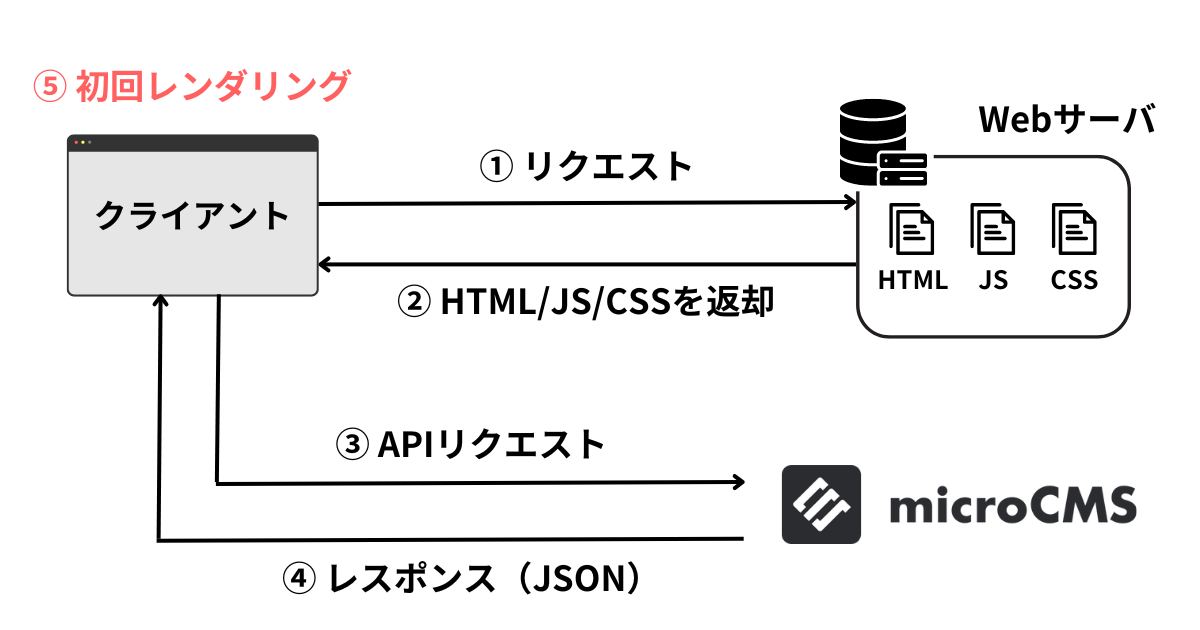
CSR is a method of dynamically generating web pages using JavaScript.

In CSR, an empty HTML file, CSS, and JavaScript are first retrieved from the server. Then, initial data is fetched from an API server (or a headless CMS like microCMS), and the HTML is rendered.

Advantages

  • Can update data in real-time based on user UI interactions
  • Easy to integrate into sites operating as static HTML
  • Can be partially integrated into already built applications

Disadvantages

  • Since data is fetched after loading static files, the initial display is fast, but data display may be slow.
  • May negatively impact SEO (search engine crawlers may not accurately recognize the content).
  • It can be difficult to display OGP accurately.
  • May not display correctly for users who have disabled JavaScript in their browsers.
  • API keys cannot be kept secret (however, this can sometimes be avoided by accessing through the server side).

Cases Suitable for CSR

  • Web applications with rich UI interactions and animations
  • Applications providing content that is not important for SEO or requires login for private content

Implementation Example

import { useEffect, useState } from 'react';
import { createClient } from 'microcms-js-sdk';

const client = createClient({
  serviceDomain: 'YOUR_DOMAIN',
  apiKey: 'YOUR_API_KEY',
});

const Announcements = () => {
  const [announcements, setAnnouncements] = useState([]);

  useEffect(() => {
    const getAnnouncements = async () => {
      const data = await client.get({ endpoint: 'announcements' });
      setAnnouncements(data.contents);
    };

    getAnnouncements();
    }, []);

  return (
    <div>
      {announcements.map((announcement) => (
        <div key={announcement.id}>
          <h2>{announcement.title}</h2>
          <p>{announcement.content}</p>
        </div>
      ))}
    </div>
  );
};

export default Announcements;

SSR (Server Side Rendering)

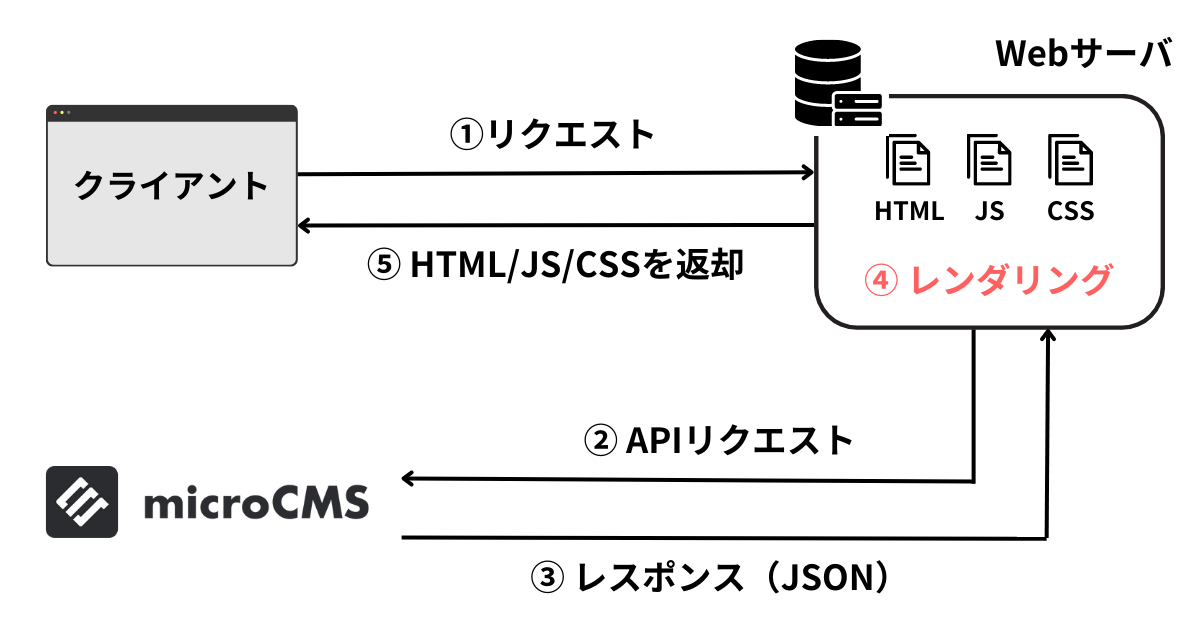
SSR is a method of generating HTML on the server side.

When the server receives a request from the client, it retrieves the necessary content through API requests and then generates HTML to return to the client.

The client receives the rendered HTML, loads the CSS and JavaScript, and displays the page.
This method contrasts with CSR, where HTML is generated on the client side.

Advantages

  • HTML is generated for each request, allowing for dynamic elements on a per-page basis.
  • Since HTML is generated on the server and sent to the client, there is no lag in displaying dynamic data.
  • As HTML is fully generated on the server, crawlers can easily understand the content, making it effective for SEO.
  • Processing is done on the server, reducing the load on the client side, which helps maintain performance even on low-spec devices or slow internet connections.

Disadvantages

  • Since HTML needs to be generated for each request, it can lead to a high load on the server, and scaling may be necessary in case of high traffic.

When SSR is Suitable

  • Websites with dynamic elements that require SEO optimization.

Implementation Example

import { createClient } from 'microcms-js-sdk';

const client = createClient({
  serviceDomain: 'YOUR_DOMAIN',
  apiKey: 'YOUR_API_KEY',
});

export const getServerSideProps = async () => {
  const data = await client.get({ endpoint: 'announcements' });

  return {
    props: {
      announcements: data.contents,
    },
  };
};

const Announcements = ({ announcements }) => {
  return (
    <div>
      {announcements.map((announcement) => (
        <div key={announcement.id}>
          <h2>{announcement.title}</h2>
          <p>{announcement.content}</p>
        </div>
      ))}
    </div>
  );
};

export default Announcements;

SSG (Static Site Generation)

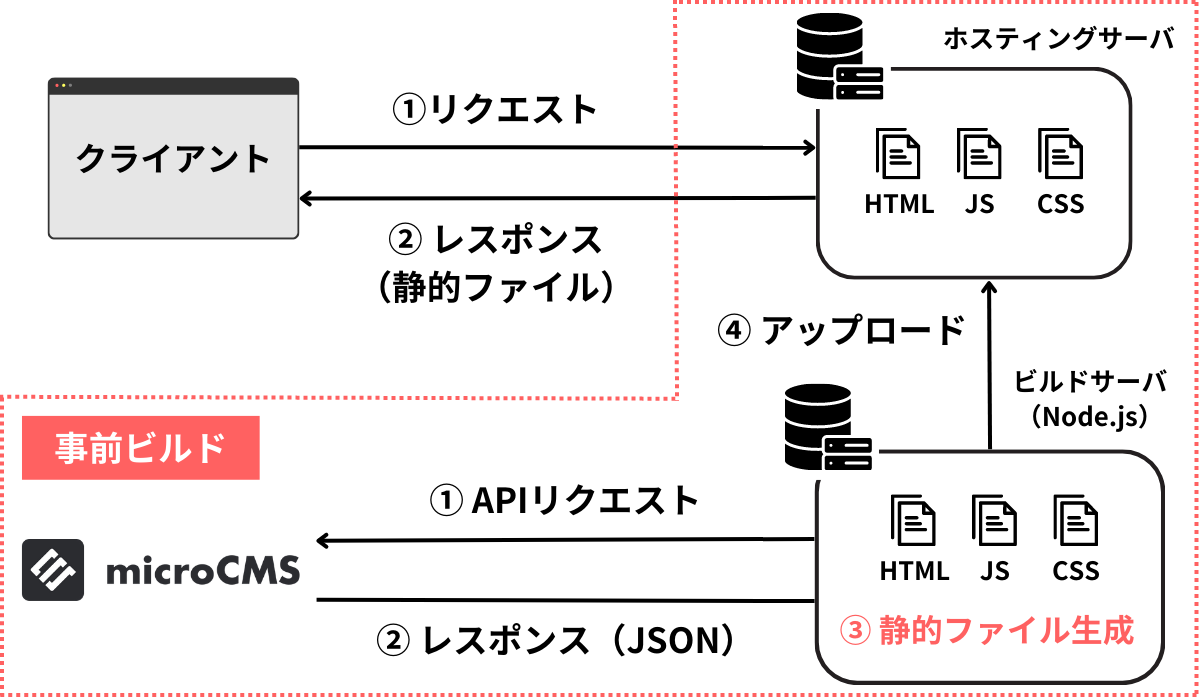
SSG is a method of generating static HTML in advance.

In SSG, when content or templates are updated, the build process is executed to pre-generate all pages. These static files are then deployed to a hosting server to respond to client requests.

To leverage the characteristics of SSG, it is common to place and distribute them via a CDN.
Advantages

  • Using static files results in a faster response time from the server to the client, improving the performance of the website.
  • Since deployment can be done simply by generating static files, it is easy to deploy and lowers the demands on the server.

Disadvantages

  • If the site has many pages, build times can become long to generate all pages.
  • Updating content requires a build process, making real-time data updates difficult (however, some data can be dynamically fetched on the client side).
  • Using static files limits the implementation of user authentication and dynamic features (however, dynamic features can be achieved on the client side using JavaScript or APIs).

When SSG is Suitable

  • Websites with a lot of static content that do not require real-time updates (such as corporate sites or blogs).

Implementation Example

import { createClient } from 'microcms-js-sdk';

const client = createClient({
  serviceDomain: 'YOUR_DOMAIN',
  apiKey: 'YOUR_API_KEY',
});

export const getStaticProps = async () => {
  const data = await client.get({ endpoint: 'announcements' });

  return {
    props: {
      announcements: data.contents,
    },
  };
};

const Announcements = ({ announcements }) => {
  return (
    <div>
      {announcements.map((announcement) => (
        <div key={announcement.id}>
          <h2>{announcement.title}</h2>
          <p>{announcement.content}</p>
        </div>
      ))}
    </div>
  );
};

export default Announcements;

ISR (Incremental Static Regeneration)

ISR is a hybrid rendering method that combines the features of SSG and SSR.

In ISR, instead of pre-building the entire site like SSG, only the necessary pages are generated at the required time. The generated pages are cached and served as static content for subsequent requests.

Additionally, a validity period can be specified for the cache, and if access occurs after the validity period has expired, the page will be regenerated. This mechanism allows for the provision of relatively fresh content.
Currently, ISR is supported by some frameworks, such as Next.js.

Advantages

  • Since the generated pages are cached, they can be served quickly on subsequent accesses.
  • There is no need to generate all pages at the time of content publication, which can significantly reduce build time.
  • Pages are regenerated at specified intervals, allowing for support for frequently updated content.

Disadvantages

  • Since pages are generated on demand during the first access, there is a possibility that the display speed may be slower at that time.
  • Pages are only regenerated at the specified intervals, which may impose limitations when real-time updates are needed.
  • The frameworks and infrastructure available for use are limited.

Use Cases for ISR

  • Large websites where building all pages takes a significant amount of time.
  • Websites with frequently updated content.

Implementation Example

import { createClient } from 'microcms-js-sdk';

const client = createClient({
  serviceDomain: 'YOUR_DOMAIN',
  apiKey: 'YOUR_API_KEY',
});

export const getStaticPaths = async () => {
  const data = await client.get({ endpoint: 'announcements' });

  const paths = data.contents.map((announcement) => ({
    params: { id: announcement.id.toString() },
  }));

  return {
    paths,
    fallback: true,
  };
};

export const getStaticProps = async ({ params }) => {
  const data = await client.get({ endpoint: `announcements/${params.id}` });

  return {
    props: {
      announcement: data,
    },
    revalidate: 10,
  };
};

const Announcement = ({ announcement }) => {
  return (
    <div>
      <h2>{announcement.title}</h2>
      <p>{announcement.content}</p>
    </div>
  );
};

export default Announcement;

Contents

  • List of Rendering Methods
  • CSR (Client Side Rendering)
  • SSR (Server Side Rendering)
  • SSG (Static Site Generation)
  • ISR (Incremental Static Regeneration)
  • Company
  • Legal Notice
  • Terms of Service
  • Privacy Policy

Copyright © microcms.io All rights reserved.